Foreign currency: rate, date and what gets booked
The rate comes from your bank payment or from you, not from a rate list; your accounting package receives the amounts in the invoice currency plus the rate
An invoice in dollars or pounds needs an exchange rate to be booked in euros. Kasklaar does not take that rate from a rate list: it comes from the bank payment you matched to the invoice, or you enter it. Without a rate you cannot approve.
Where the rate comes from
If you match a bank payment to the invoice, Kasklaar calculates the rate: the euro amount paid divided by the invoice amount. That way you book exactly what you paid, including your bank's margin. Kasklaar does check that rate against the market rate on the payment date; if it deviates too much, Kasklaar assumes it was a partial payment and no rate is set.
If there is no payment yet, the invoice shows the notice An exchange rate is needed to convert from USD to EUR with the button Enter rate. You enter the euro amount you paid or will pay, or the rate itself; Kasklaar shows both directions.
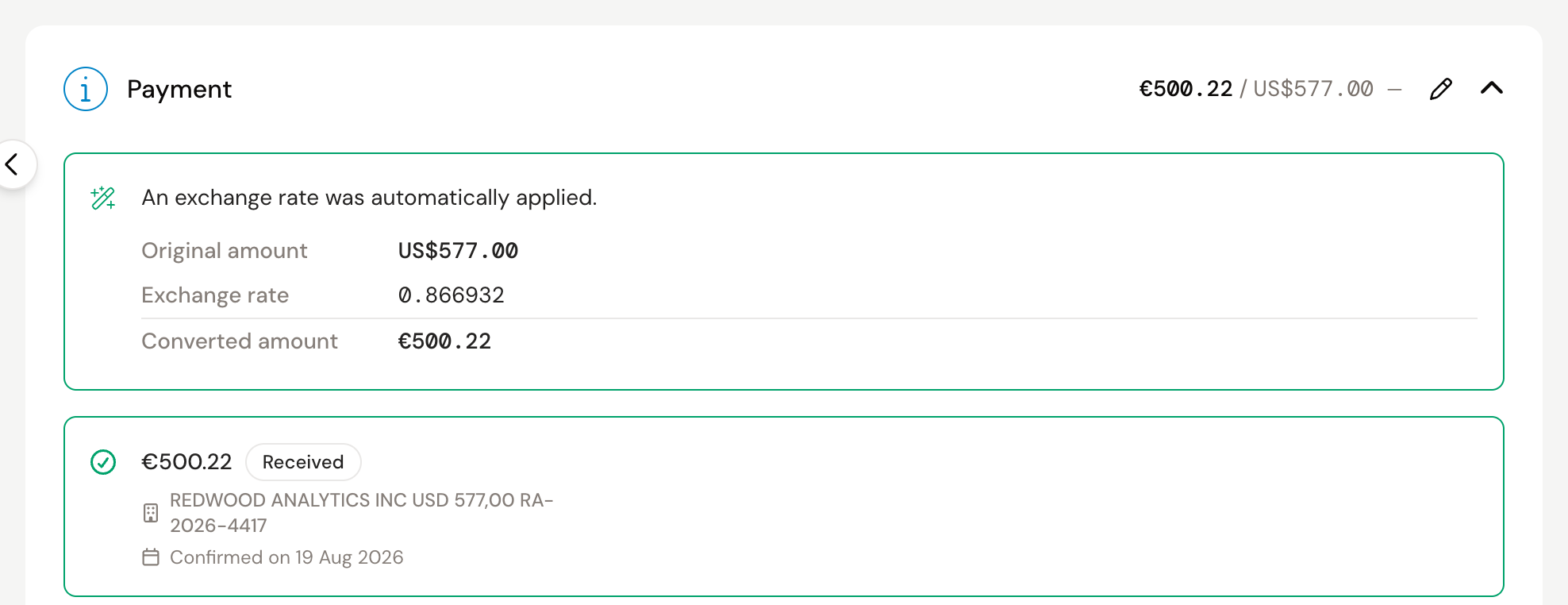
Once the rate is applied, the invoice shows Original amount, Exchange rate and Converted amount. With Edit exchange rate you change it.
Why no rate from the ECB?
Because you would then book a different amount than you paid, and have to write off that difference later as an exchange result. The payment is the real amount. Kasklaar only uses the market rate to check whether a derived rate can be right.
What goes to your accounting package
The entry goes in the invoice currency: line amounts and VAT in dollars, plus the rate. Your accounting package converts to euros itself. The entry date is the invoice date. Foreign VAT on such an invoice stays in the invoice currency; the rate does not touch it.
For booking, the currency has to be enabled, in Kasklaar and in your accounting package. See Enabling a currency.
Frequently asked questions
The payment does not cover the invoice. After applying the rate, the bank amount and the converted amount have to match to within ten cents. Otherwise Kasklaar says "The confirmed payment does not cover the invoice": correct the invoice, match another transaction, or resolve the notice if it is a deliberate partial payment.
Can I dismiss the Exchange rate missing notice? No. Without a rate there is nothing to book.
I entered a wrong rate. Open the invoice and click Edit exchange rate, as long as it is not booked yet.
Your agents got it wrong. Tell us, every time. Click the speech bubble at the top right of the invoice, Give feedback, and describe what went wrong; we look at it and use it to improve processing. Correct the invoice yourself as well, so it is right straight away.