How your agents determine the VAT scenario
The VAT scenario is read from the invoice itself; Kasklaar then picks the country, the deductibility and the VAT code from your accounting package, and asks you when that fails
The VAT scenario on a booking proposal says how the VAT on this invoice works: exclusive, inclusive, zero-rated, exempt, reverse charge or margin scheme. Your agents read that scenario from the document itself. Kasklaar then works out, in fixed steps, which VAT code from your accounting package belongs to it.
Where you see it
Open a purchase invoice. At the top is VAT scenario, for example VAT exclusive or Reverse charge (EU supplier). Each line shows the chosen VAT code, and at the bottom are the VAT rows with the rate and the amount the VAT is calculated on. If the scenario is wrong, pick another one at the top; Kasklaar then reassigns the codes.
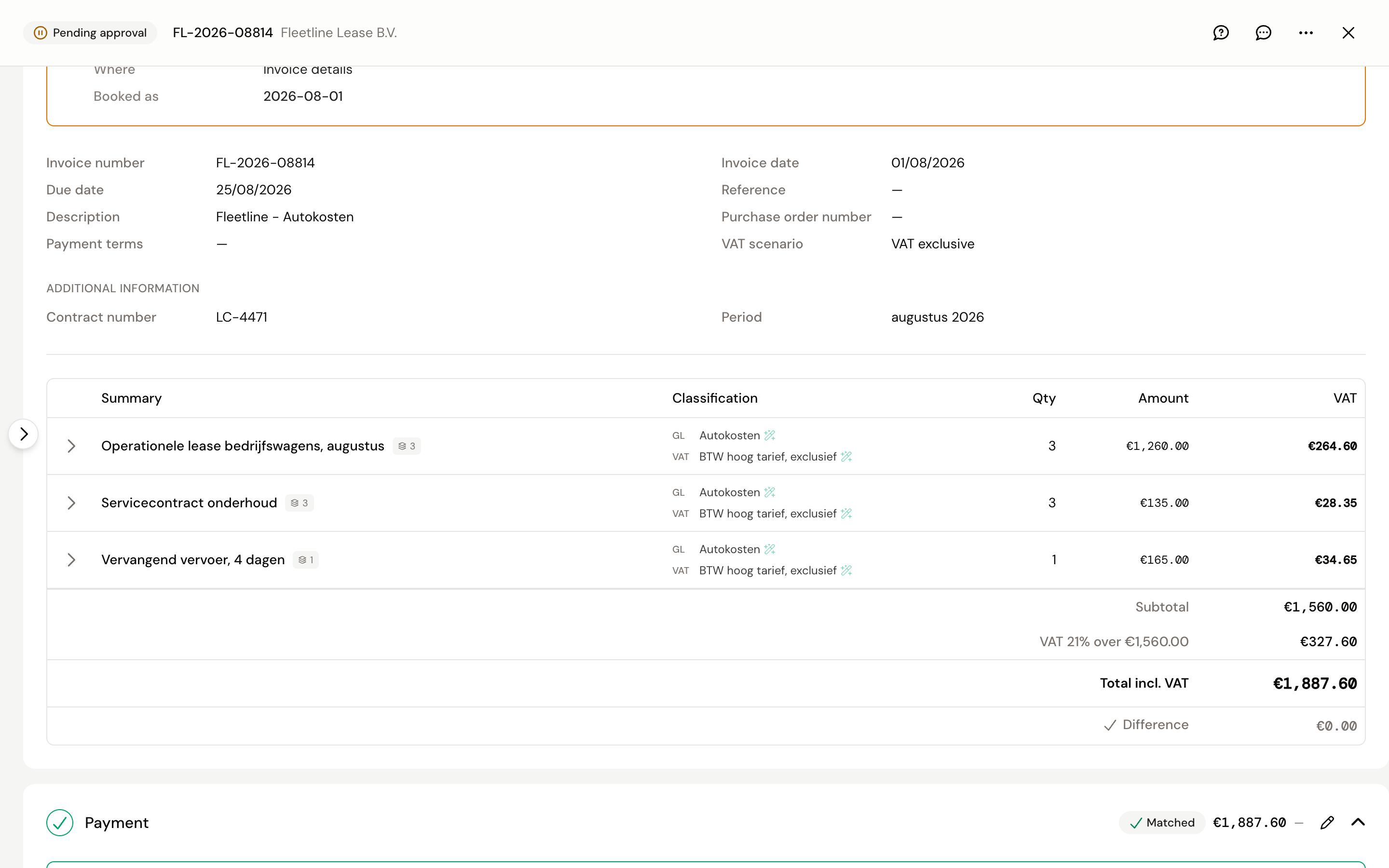
Step 1: reading the scenario from the document
For a PDF or photo, your agents read what is on the invoice: phrases such as "VAT reverse charged" or "exempt", references to legal articles, and how the amounts are built up. What is literally there comes first. If there is nothing, the supplier's country counts.
For an e-invoice (UBL, Peppol) the scenario is already in the XML. Kasklaar reads per line which kind of VAT is on it; with several kinds, the one with the largest amount wins.
Why does Kasklaar not work out the scenario from the amounts itself?
The scenario cannot be derived reliably from amounts alone: 0% VAT can mean zero-rated, exempt or reverse charge, and that difference decides which box of your VAT return the amount lands in. The text on the invoice is the source the tax office uses too. So Kasklaar reads that text rather than calculating backwards.
Step 2: country and deductibility
Kasklaar works out which country the VAT comes from: from the VAT rows on the invoice, otherwise from the supplier's address. If that is your own country, the VAT is deductible. If it is another country, the VAT goes into the cost, unless you enabled that country under EU VAT refund countries. See Reverse-charged VAT, import and foreign VAT.
Step 3: choosing the VAT code
Per line Kasklaar goes through this order and stops at the first that fits:
- A code you chose on this line stays, even when the invoice is processed again.
- A hint in the email the invoice was forwarded with, if you have email instructions enabled.
- An instruction that prescribes a VAT code, or a type and percentage, see Instructions.
- For reverse charge: the reverse charge code you configured under Administration details for that situation: EU, non-EU or domestic.
- Otherwise look it up: a purchase code from your chart of accounts with the same type and percentage as the line. If there are several, the default from your VAT settings.
If step 5 fails, Kasklaar says so: No VAT code is configured for this scenario when no code fits, or VAT code is ambiguous when several fit and you have no default. Both set the invoice to Needs input until you pick a code or set a default under Administration details.
Why "0% / geen btw" and not simply 0%?
Your accounting package has two kinds of 0% code. "Geen BTW" (no VAT) is left out of your return. "BTW 0%" does report the amount as a taxable base in a return box. For a domestic line without VAT, Kasklaar picks "Geen BTW", unless you set a different 0% code yourself under Default VAT codes.
Frequently asked questions
The scenario was read wrongly. Pick the right scenario at the top. Kasklaar reassigns the VAT codes; the lines you had already chosen yourself stay as they are.
Why is there a warning that the VAT code does not fit the scenario? You picked a code that does not belong to the scenario, for example a 21% code on a reverse-charged invoice. You can approve, but check which of the two is right.
A line is at 0% while there is VAT on the invoice. The percentage on that line was not readable; Kasklaar then sets it to 0% without a separate notice. Fill in the percentage or pick the right code.
Your agents got it wrong. Tell us, every time. Click the speech bubble at the top right of the invoice, Give feedback, and describe what went wrong; we look at it and use it to improve processing. Correct the invoice yourself as well, so it is right straight away.
See also
- Reverse-charged VAT, import and foreign VAT
- Administration details, for the default VAT codes per rate.
- Review and approve a purchase invoice