How a ledger account is chosen
Per line, your own choice and your instructions come first, then your agents themselves that searches your chart of accounts and knows the supplier's earlier bookings; when in doubt, Kasklaar says so
Every line on a booking proposal gets a ledger account. Kasklaar chooses it only once the supplier, the VAT code and the line structure are settled, and does so in a fixed order: first what you and your instructions decided, then your agents themselves. When in doubt, Kasklaar says so.
The fixed order
Per line, Kasklaar stops at the first step that yields an account:
- Your own choice. If you ever picked an account on this line yourself, it stays, even when the invoice is processed again or you switch supplier.
- A hint in the email you forwarded the invoice with, if you have email instructions enabled. It outranks your instructions and your agents' own choice, but not your own choice on the line.
- An instruction with an account number. An instruction of the type Set GL account wins, if the account exists in your chart. You then see the green notice "GL account X was assigned by an instruction". See Instructions.
- Your agents themselves, for the lines still empty after that.
What your agents know and do
Your agents only choose from accounts that exist in your chart of accounts; they never invent one. They know the invoice, the supplier, what was booked for that supplier before, your cost centres and the text of instructions of the type Guide your agents on the ledger account. With too little certainty they leave the line empty, so you see it.
Why do your agents keep picking the same account for this supplier?
Because they see what was booked for that supplier before and lean on that heavily. One earlier booking makes the same account likely, not certain: if the description clearly does not fit, your agents pick something else, with lower confidence. To make it hard, create an instruction with the condition Supplier is and the action Set GL account.
When in doubt, Kasklaar says so
If your agents are not confident enough, the line gets the warning GL account low confidence, with alternatives. If your agents find nothing, GL account not found, with suggestions. You see them as an icon next to the account on the line; hover for the explanation. Both warnings disappear once you save the invoice.
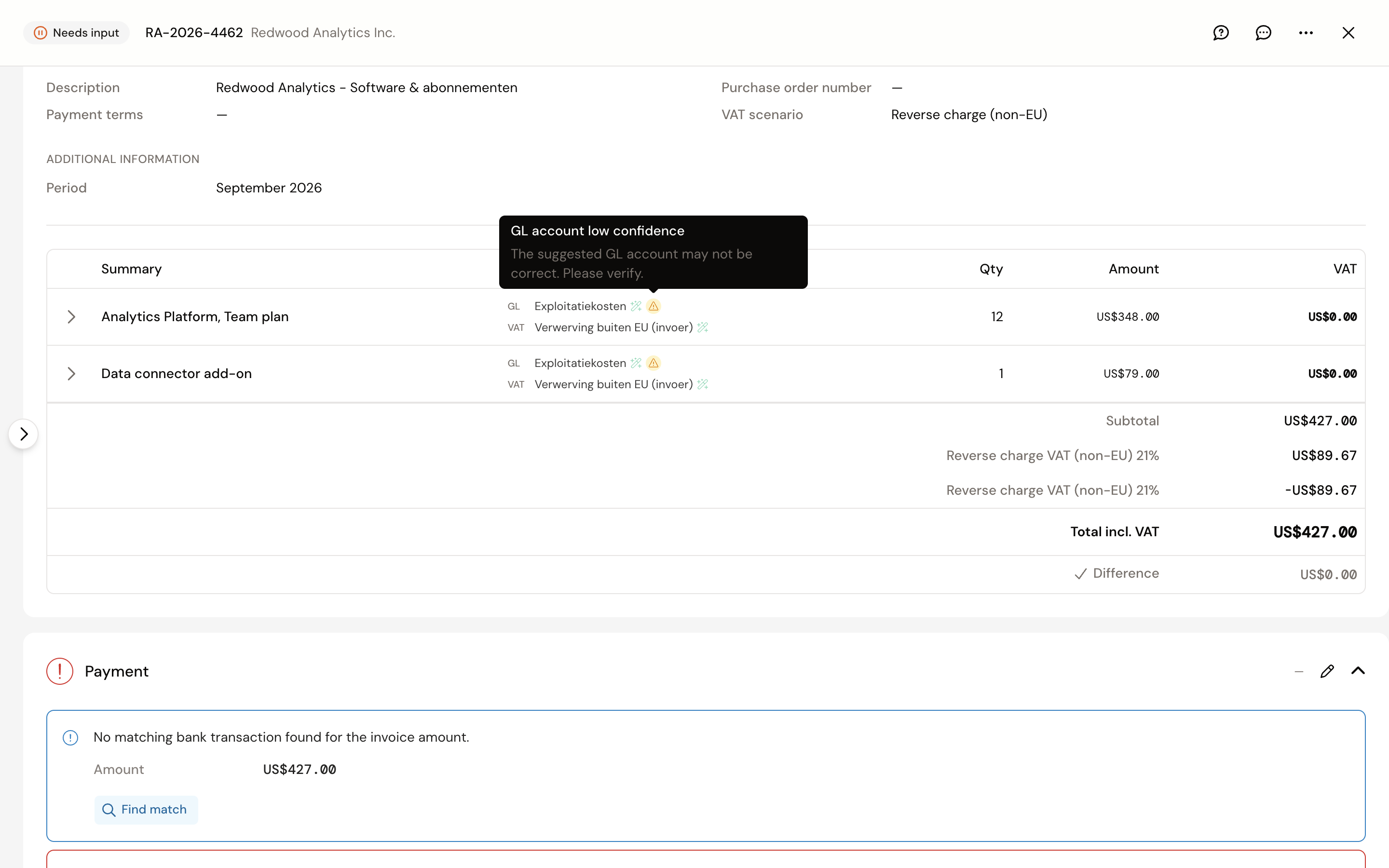
A warning does not stop approval. A line without an account does: Kasklaar then says "Line X still needs a GL account and VAT code" and you pick one yourself.
The Confidence you see in the list is a summary: per line how certain the account and the VAT code are, and per invoice the weakest line. An account from an instruction or from your own choice counts as certain; a choice by your agents themselves counts lower, even when it is right.
Frequently asked questions
Can I set a fixed account per supplier? Not on the supplier card. Create an instruction with the condition Supplier is; it works the same way.
Why is there an instruction from my accountant on my invoice? An instruction from the firm applies to all its clients. You can switch it off per administration under Instructions. An instruction from your own administration always comes first.
I have an instruction in words and one with an account number. The one with the account number wins; the text does not reach your agents then.
Your agents got it wrong. Tell us, every time. Click the speech bubble at the top right of the invoice, Give feedback, and describe what went wrong; we look at it and use it to improve processing. Correct the invoice yourself as well, so it is right straight away.